
Connect, monitor and reconcile your commerce operations.
This extension brings SAP integration management into Magento Admin. Designed for Magento Open Source and Adobe Commerce, it supports outbound order exports through direct SAP APIs or SAP Integration Suite.
Configure connections, build field mappings, preview payloads and track transactions through a central dashboard. Asynchronous processing, controlled retries, document confirmation and audit timelines help administrators investigate integration issues.
A built-in demo lets you explore the workflow without a SAP account. Fictional transactions demonstrate successful delivery, asynchronous acceptance, validation failures, rate limits and uncertain outcomes.
Key features
- Guided setup with separate demo and live environments.
- Visual Mapping Studio with payload previews.
- Direct API and SAP Integration Suite connection modes.
- Asynchronous queue with controlled retries.
- SAP document tracking and reconciliation.
- Missing-order recovery and operational diagnostics.
- Granular Magento admin permissions.
- Composer-ready installation.
- Optional Adobe Commerce B2B company-export adapter.
Send Magento orders to SAP and manage delivery, document confirmation and exceptions from Magento Admin. The connector targets Magento Open Source and Adobe Commerce 2.4 installations. It supports direct SAP API connections and SAP Integration Suite iFlows. A built-in demo lets administrators try the workflow with seven sample transactions and no SAP account.
What it does
| Capability | What you can do |
|---|---|
| Guided Setup | Choose demo or live mode and configure the receiver, authentication and SAP organisation values. |
| Mapping Studio | Map source fields to SAP fields, apply defaults and lookup translations, preview JSON and inspect OData metadata. |
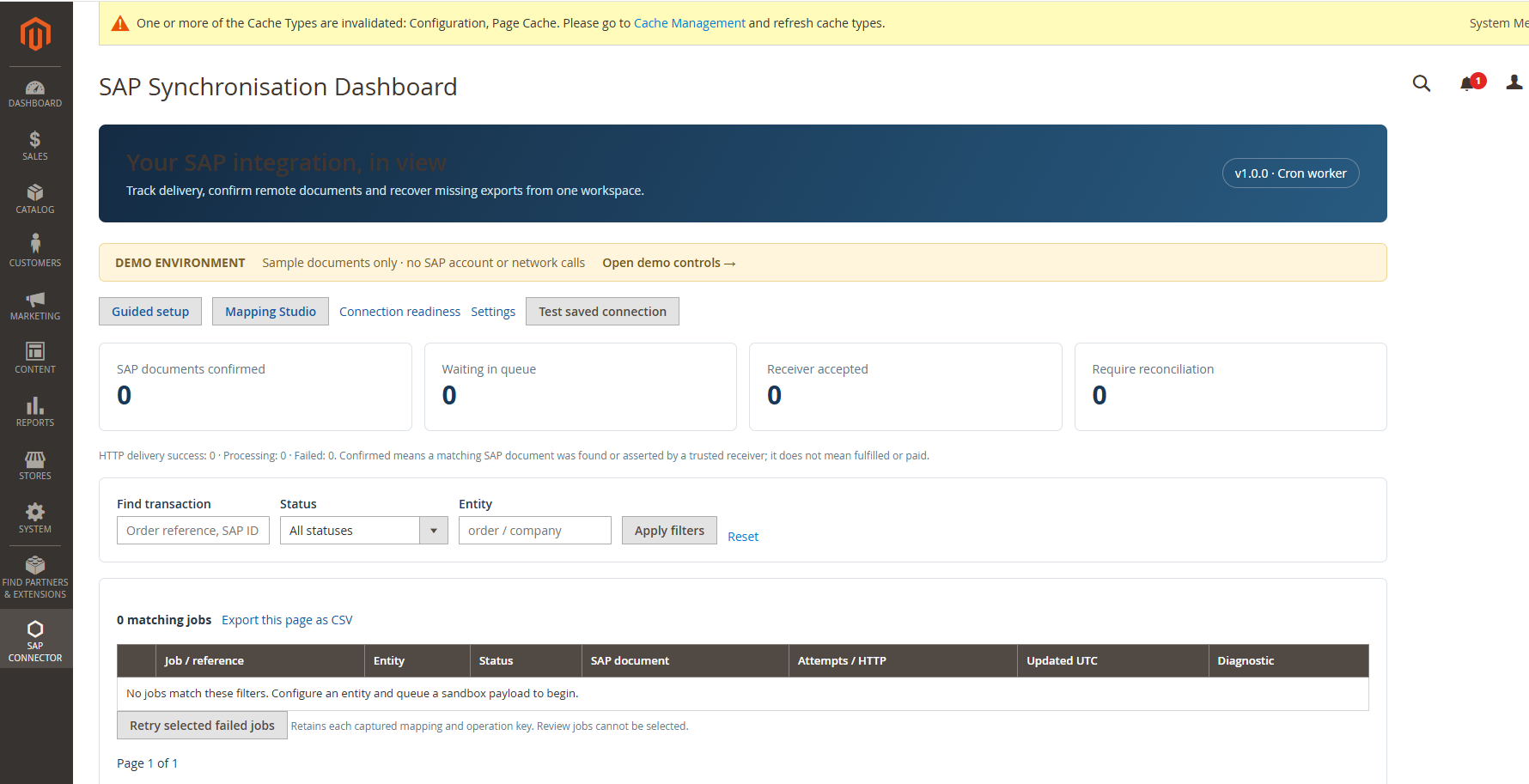
| Transaction dashboard | Find jobs by order reference, remote document ID or correlation key. Inspect status, diagnostics and audit events, and export the current filtered page to CSV. |
| Document reconciliation | Confirm that a matching SAP document exists through a read-only lookup or an authenticated receiver acknowledgement. |
| Retry and recovery | Retry failed jobs, investigate uncertain deliveries and identify orders that missed their initial export. |
| Optional Commerce B2B adapter | Queue company snapshots using a separate package on Adobe Commerce with Magento_Company. |
Version 1.0.0 covers outbound orders and mapped entity exports. Inbound product, inventory, price and customer synchronisation are outside this release’s scope. Live connection settings apply globally. The optional adapter covers company snapshot export.
How an order moves through the connector
- Queue. With automatic export enabled, the connector queues the initial export after the order save commits. An administrator can also queue an order manually.
- Capture. The job records the source data, routing rules, mapping and receiver settings. A stable operation key identifies the job across retries.
- Send. A Magento cron worker claims the job, applies the mapping and sends the payload to the configured SAP endpoint or iFlow.
- Confirm. A document lookup or trusted acknowledgement links the job to its SAP document. An HTTP 202 records receiver acceptance while the document is still awaiting confirmation.
- Resolve. The dashboard shows failed and uncertain jobs separately. Correct known failures before retrying. Investigate an uncertain delivery in SAP before authorising a replay. Persistent receiver deduplication is required for safe automatic retries of write failures where the outcome could be ambiguous.
Install the module
Use an existing Magento 2.4 installation with PHP 8.2 or later within the PHP support range of your Magento release. The module requires cURL, DOM, JSON and ctype. With Docker, use the Magento PHP container and run the commands from the Magento project root as the Magento filesystem owner.
Extract the release ZIP into the project root so that sap-s4hana-connector-v1.0.0/packages/core is present alongside Magento’s existing folders. Then run:
composer config repositories.sapintegration-sap path './sap-s4hana-connector-v1.0.0/packages/*'
composer require 'sapintegration/module-sap-s4hana-connector:^1.0.0'
bin/magento module:enable SapIntegration_SapConnector
bin/magento setup:upgrade
bin/magento setup:di:compile
bin/magento cache:clean
Deploy admin static content according to your Magento deployment mode and configured locales. If Magento cron needs configuring, install it with bin/magento cron:install and ensure the container or host runs the scheduler. To invoke the default group manually, use bin/magento cron:run --group=default. Subsequent cron ticks process due jobs.
As an alternative to Composer, copy the contents of packages/core/ to app/code/SapIntegration/SapConnector/ and run the module enable, upgrade, compilation and cache commands above. Choose one installation method. For an installation under the previous vendor name, plan a configuration and queue data migration in staging. See docs/UPGRADE.md.
In System → Permissions → User Roles, grant the SAP Connector permissions each administrator needs. Configuration, mapping, reconciliation, retry, verified replay, export and API acknowledgement can be assigned separately.
Try it without SAP credentials
Open SAP Connector → Guided Setup → Built-in demo and save. In Demo Workspace, choose Create sample orders, Process sample queue and Confirm sample documents. Then choose Advance retry timers, process again and confirm again.
| Expected outcome after the full sequence | Count |
|---|---|
| Confirmed synthetic SAP documents | 4 |
| Rejected transaction | 1 |
| Ambiguous match requiring review | 1 |
| Accepted, awaiting a document | 1 |
The receiver runs locally with fictional payloads, separate mappings and a separate job queue. The sample records live in the connector. The browser preview included with the ZIP shows the interface and mapping previews before installation. Persistent processing runs inside the installed Magento module.
Configure a live SAP connection
- Choose the route. Open SAP Connector → Guided Setup → Live receiver, or go to Stores → Configuration → SapIntegration → SAP S/4HANA Connector. Select Direct SAP API for an SAP endpoint or SAP Integration Suite for your deployed iFlow.
- Set up access. Enter the trusted HTTPS receiver URL, a read-only test path and Basic or OAuth client credentials. For OAuth, supply the token endpoint. For SAP OData writes that require CSRF, enable token fetch and enter the service root. For iFlows, follow the sender adapter’s CSRF requirements.
- Configure routes and mappings. Start with
examples/routes.jsonandexamples/mappings.json. Replace sample organisation, partner and material values with those for your tenant. Previewexamples/order-source.jsonin Mapping Studio and check the result against the receiver contract. - Test a sandbox order. Enable the connector and run Test saved connection. Then queue one controlled sandbox payload under a unique operation key. Check the dashboard timeline and verify the resulting document in SAP. A read-only connection test validates the GET endpoint. The sandbox export verifies write access and mapping.
- Set up confirmation. Configure document lookups or authenticated acknowledgements from the receiver. Match documents using the agreed business reference or remote identifier. See
docs/RECONCILIATION.mdfor the request contracts and identity checks. - Enable automation. Turn on automatic order export, document lookup and recovery as needed after sandbox validation. Set a UTC recovery start date before using the scanner.
Operate and troubleshoot
| Dashboard state | What to check |
|---|---|
| Pending or processing | Check cron, the worker pause control and any scheduled retry delay. |
| Delivered or accepted | Check the receiver and look up the SAP document. |
| Confirmed | Inspect the recorded SAP document ID. Fulfillment and financial reconciliation are separate processes. |
| Failed | Review diagnostics and correct the issue. Retry using the saved mapping or explicitly refresh settings and retry. |
| Review | Check whether SAP already created a document before deciding on replay. |
To queue an initial export manually, substitute the Magento internal order ID for 123.
bin/magento sap:order:queue 123
bin/magento sap:orders:recover
bin/magento sap:orders:recover --enqueue
Run recovery without --enqueue to preview the next batch. Run it with --enqueue to queue missing initial jobs and advance the cursor. Keep the original operation key when recovering an initial export.
For Adobe Commerce B2B company exports, install sapintegration/module-sap-s4hana-commerce-b2b:^1.0.0, enable SapIntegration_SapCommerceB2b and repeat the normal Magento deployment commands. Configure a company route and mapping before using bin/magento sap:company:queue 12 company:12:initial. Use the core module alone on Magento Open Source.
Credentials and retained snapshots use Magento encryption. Grant configuration and replay access only to the roles responsible for those operations. Follow the release’s docs/ACCEPTANCE.md for staging checks. The v1.0.0 release carries the tested demo baseline of 231 assertions and 19 XML schema validations. Installation on a Magento instance and live SAP acceptance remain pending.